-
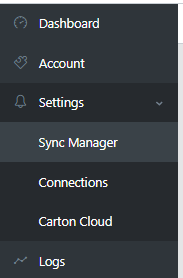
Fromt the menu, select Settings > Sync Manager
-
Click New Connection
-
Select your connection from the list. If you have mutliple types available to you, you are able to filter
-
Click create new

-
This will bring you to the configuration screen
Settings for Orders
- The following options dictate how the orders flow from Shopify to Myob
| Setting | Description | Notes / Requirements |
|---|---|---|
| Sync orders from Shopify with status | Select the order statuses that will be brought into MYOB. | At least one status is required. |
| Last Shopify order entered in MYOB | Prevents re-syncing older orders already in MYOB. | |
| Customer type for orders | Choose whether to use a generic customer, create a new customer, or fall back to an existing code. | Matching is done on email (and company for some accounts). • New customers are created from Shopify customer/shipping details. • For a generic customer, select them in “Existing customer code”. |
| Existing customer code | Customer to use for all orders when customer type is “Existing Code”. | Required when Customer type for orders is set to use an existing customer. |
| Create customer as | Individual or Company when creating new MYOB customers. | Only applies when creating new customers. |
| Invoice delivery method | How invoices are delivered to the customer in MYOB. | Optional. |
| Customer layout | Layout applied to new customers. | Optional. |
| Transactions include tax | Send order to MYOB inclusive or exclusive of tax. | |
| MYOB tax code | Tax code used when a line has tax. | |
| MYOB tax free code | Tax code used when a line has no tax. | |
| Send to MYOB as transaction type | Controls the type of transaction created in MYOB. | Order or Invoice. |
| Use Shopify order number as MYOB number | Send the order using the Shopify order number instead of letting MYOB generate its own. | Leave disabled to use MYOB’s own numbering. |
| Order number prefix | Prefix prepended to the Shopify order number when using it as the MYOB number. | Only relevant when “Use Shopify order number” is enabled. |
| Match stock on | Field used to match items sold in Shopify to items in MYOB. | MYOB item Number/Name must match the selected field. |
| Default / non-stock item | Fallback item used when a Shopify product has no matching item in MYOB. | Recommended to avoid failed lines. |
| Sales person | Salesperson assigned to the order in MYOB. | Optional. |
| Shipping method text | Populates the shipping method on the MYOB order. | |
| Include customer details on delivery address | Adds email/phone to the Ship To address. | |
| Send payment to MYOB | Send payments to MYOB when the Shopify order is paid. | |
| Payment deposit to | Deposit account type for payments. | Required if sending payments. |
| Payment account | Default bank/account to receive payments. | Required if sending payments. |
| Apply payment to invoice | Whether the payment is applied directly to the invoice/order. | |
| Account per payment gateway | Map different Shopify payment gateways to different MYOB accounts. |